

Button names are shown as in the French interface.
Plan comparison
Current prices are on bitaqa.tn/tarifs.
The Facturation (Billing) menu
Click Facturation in the left menu: two pages open.- Plans: the plan comparison (“Détails des tarifs”).
- Mon Plan: your subscription and invoices.
View and manage your subscription
1
Open Mon Plan
Click Facturation, then Mon Plan.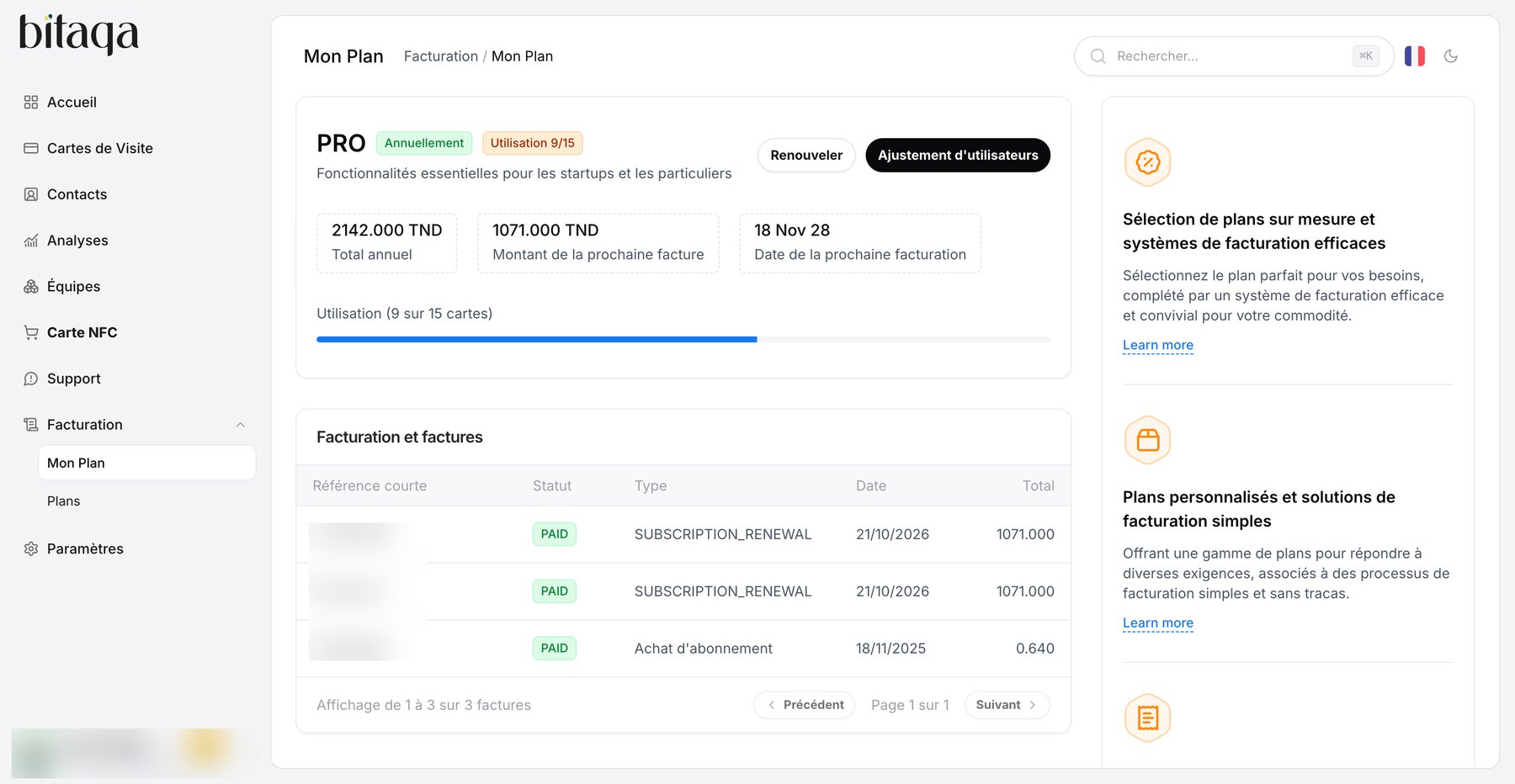
2
Read your plan
At the top you see your plan (for example PRO), its billing period (Annuellement, yearly), your quota (Utilisation 9/15), the Total annuel, the Montant de la prochaine facture (next invoice amount) and the Date de la prochaine facturation.
3
Choose an action
- Renouveler to extend your subscription.
- Ajustement d’utilisateurs to change the number of cards. Pricing is prorated over the remaining subscription time.
4
Check your invoices
The Facturation et factures table lists each invoice with its Référence courte, Statut (for example PAID), Type, Date and Total.
The Ajouter des Vcards button on the Cartes de Visite page also leads to the plans page to increase your quota.